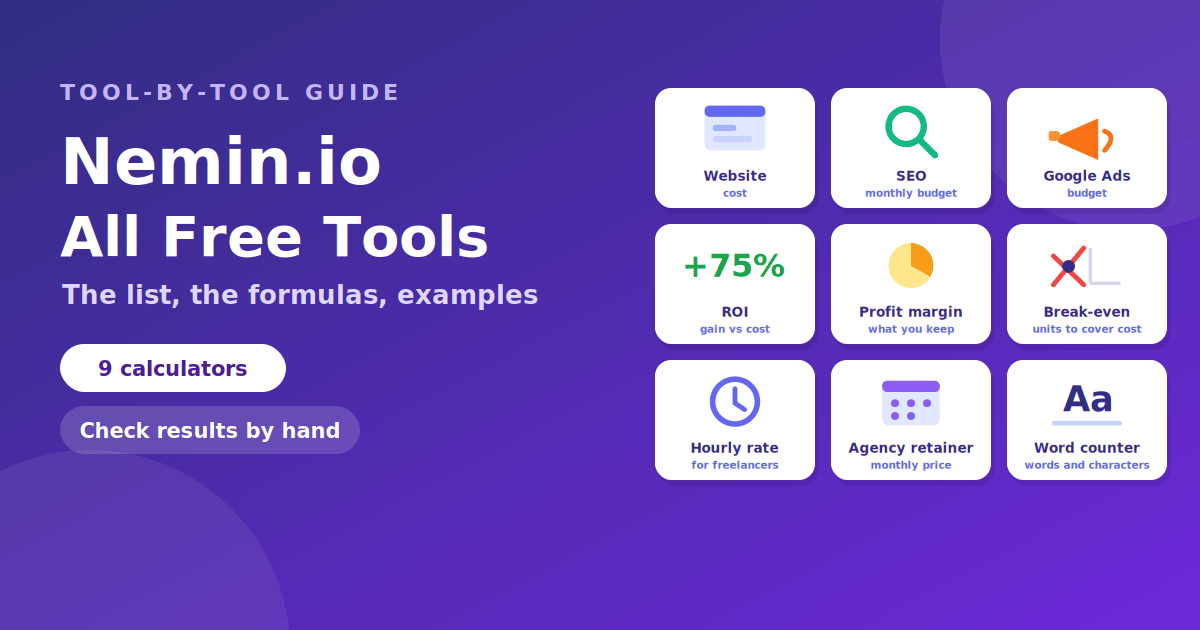
Nemin.io offers a set of free business and marketing calculators, and each one answers a single planning question: what to charge, what to spend, or what to expect back. This guide lists the tools shown on the site's tools page, explains what each one is for, gives the standard formula behind the idea, and works through a small example. The site's pages do not publish the exact method for every calculator, so the formulas here are the standard ones, useful for checking any result by hand. Our overview of what nemin.io is covers the site itself.
The list at a glance
| Tool | Question it answers |
|---|---|
| Website Cost Calculator | What might a business website cost? |
| SEO Cost Calculator | What is a realistic monthly SEO budget? |
| Google Ads Budget Calculator | How much should I plan to spend on ads? |
| ROI Calculator | Did a project earn more than it cost? |
| Profit Margin Calculator | How much of each sale do I keep? |
| Break-Even Calculator | How much must I sell to cover costs? |
| Freelancer Hourly Rate Calculator | What hourly rate meets my income goal? |
| Agency Retainer Calculator | What should a monthly retainer cost? |
| Word Counter | How long is this text? |
The site's own overview post mentions 11 tools, so check the tools page for any additions. All of them are described as free and usable without an account. Remember the terms describe results as estimates for planning.
Website Cost Calculator
What it does: estimates the cost of building a business website. What drives the number: the number of pages, whether you need custom design, e-commerce, integrations, copywriting and ongoing maintenance. How to use it well: enter the scope you really need, then ask two or three developers to quote the same scope and compare. If your quote is far from the estimate, the scope is usually the reason, not the price per hour. Before you build, our on-page SEO checklist shows what a site needs for search.
SEO Cost Calculator
What it does: calculates a monthly SEO budget. What drives the number: how competitive your keywords are, how much content and technical work is needed, and whether you hire an agency or do it in-house. A caution: SEO results are not guaranteed, so treat the budget as an investment range. You can lower cost by choosing winnable topics first, which our guide to finding low-competition keywords explains.
Google Ads Budget Calculator
What it does: helps plan advertising spend. Useful formula: monthly budget ≈ daily budget × 30.4. Google states that it will not charge more than your average daily budget multiplied by 30.4 in a month, as described in the Google Ads Help Center. Example: a $25 daily budget gives a monthly limit of about $760. Work backwards: if you know your cost per click and the share of clicks that become customers, you can estimate how many customers a budget buys.
ROI Calculator
What it does: compares what a project returned with what it cost. Formula: ROI (%) = (gain − cost) ÷ cost × 100, as set out by Corporate Finance Institute and Nasdaq. Example: you spend $2,000 on a campaign and it brings in $3,500 of profit-relevant revenue. ROI = (3,500 − 2,000) ÷ 2,000 = 0.75, or 75%. Limits: ROI ignores time, so a 75% return over three years is very different from 75% in three months. For marketing, be careful about which revenue you attribute to the spend.
Profit Margin Calculator
What it does: shows the share of revenue left after costs. Formula: margin (%) = (revenue − cost) ÷ revenue × 100. Example: revenue of $10,000 and costs of $7,500 leave $2,500, a 25% margin. Margin vs markup: markup is profit divided by cost. The same example has a markup of 2,500 ÷ 7,500 = 33.3%. Mixing the two up is a common pricing mistake, because a 25% markup gives only a 20% margin.
Break-Even Calculator
What it does: finds the sales needed to cover your costs. Formula: break-even units = fixed costs ÷ (price per unit − variable cost per unit). Example: fixed costs of $10,000, a price of $20 and a variable cost of $10 give 10,000 ÷ 10 = 1,000 units. Below that you lose money, and above it you earn profit. Use it for: testing a price change. Raise the price to $25 and the break-even falls to about 667 units.
Freelancer Hourly Rate Calculator
What it does: turns an income goal into an hourly rate. Formula: rate = (desired income + business expenses + taxes) ÷ billable hours. Example: you want $60,000 take-home, expect $12,000 of expenses and set aside $18,000 for taxes, which totals $90,000. If you can bill 1,200 hours a year, the rate is $75 an hour. Key point: billable hours are far fewer than working hours, because admin, sales and time off do not count. Our guide to time tracking apps helps you measure the real number, and our invoice guide covers billing once you have the rate.
Agency Retainer Calculator
What it does: helps price a monthly retainer. Formula: retainer = (hours × hourly rate) + overhead or buffer. Example: 20 hours at $100 is $2,000, and a 15% buffer for meetings and revisions brings it to $2,300. Tips: define what is included, set a cap on hours, and say what happens when the client asks for more. If you manage many clients, a CRM helps you keep track of scope and renewals.
Word Counter
What it does: counts words, characters, sentences and paragraphs. Why it matters: word counts help you meet briefs, titles and meta descriptions limits. A rough reading time is words ÷ 200 to 250 per minute, so a 1,000-word article takes four to five minutes. For search snippets, aim for a meta description of about 120 to 160 characters.
How to check any result by hand
- Re-do the sum on paper. Use the standard formula above and compare.
- Change one input. If a small change causes a huge swing, the tool is sensitive to that number and you should verify it.
- Use round numbers first. It is easier to spot a typo.
- Check units. Monthly vs yearly and hours vs days are common slips.
- Compare to real quotes or past results. Estimates should sit in the same range.
Frequently asked questions
How many tools does nemin.io have? The tools page lists nine in the groups above, and the site's overview post mentions 11, so the number may have grown.
Are the tools free? The site says they are, with no account needed.
Which tool is best for freelancers? The Freelancer Hourly Rate Calculator, followed by profit margin and break-even.
Which tool is best for marketers? The ROI, Google Ads Budget and SEO Cost calculators.
Can I trust the numbers? They are planning estimates. Check them with the formulas above.
Where can I read the tools' terms? On the site's terms and conditions page.
The takeaway
Nemin.io's free calculators cover website cost, SEO budget, ad spend, ROI, profit margin, break-even, hourly rate, retainers and word count. Each answers one planning question, and each rests on a simple formula you can check by hand. Use them for quick estimates, compare with real quotes, and keep your inputs honest.