Many small teams start tracking leads in a spreadsheet, and that is a perfectly good choice. The question is when it stops being good enough. This guide compares a CRM and a spreadsheet, shows the warning signs that it is time to switch, and covers when staying put is the smarter move.
What a spreadsheet does well
A spreadsheet is free or already paid for, flexible, and familiar. You can create columns for anything, sort and filter in seconds, and share the file with a teammate. For a solo founder or a team with a handful of active deals, that is often all you need.
What a CRM adds
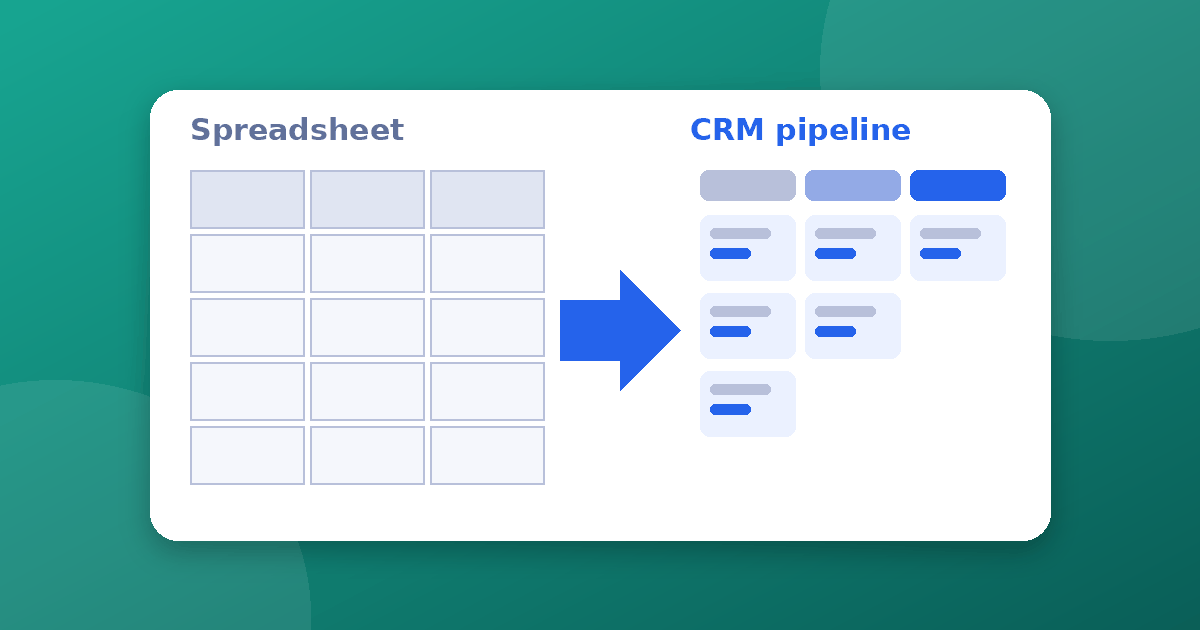
A customer relationship management tool stores contacts, companies, deals, and conversations in one place. The practical advantages over a spreadsheet are:
- A shared, current record. Everyone sees the same data instead of separate copies.
- Activity history. Emails, calls, and notes attach to each contact automatically or with one click.
- Pipeline stages. You see which deals are at which step, not just a list of names.
- Reminders and tasks. Follow-ups are scheduled instead of remembered.
- Permissions and an audit trail. You control who can view or edit records.
- Reporting. Conversion rates, deal values, and stage times are easy to pull.
Signs it is time to switch
- Leads slip through the cracks. You find out about a missed follow-up after the prospect has moved on.
- More than one person edits the sheet. Conflicting versions, overwritten cells, and "which file is current?" messages pile up.
- You cannot see history. You do not know who contacted a lead last or what was said.
- The sheet is hard to read. Dozens of columns, color codes, and hidden tabs mean only one person understands it.
- You need reporting. You are copying numbers by hand to answer simple questions about the pipeline.
- Your process has stages. Deals move through steps, and you want to see them at a glance.
- Customer data is sensitive. You need access control that a shared file cannot provide.
There is no magic number of contacts or deals that triggers the switch. Three or more of the signs above is a sensible rule of thumb.
When a spreadsheet is still the right call
- You are a solo operator with a short list of active relationships
- You have no repeatable sales process yet and are still experimenting
- Your team will not keep a CRM updated, which makes it worse than a simple sheet
- Budget is tight and the tool would cost more than the time it saves
An unused CRM is just an expensive, empty spreadsheet. Process matters more than software, a point we cover in CRM best practices without a RevOps team.
The real costs of switching
The subscription is only part of it. Plan for setup time, cleaning and importing old data, training the people who will use it, and a period when work feels slower. Check pricing structure carefully too, since plans can charge per user or by usage. Our explainer on per-seat vs usage-based pricing shows how costs change as you grow.
How to move from a spreadsheet to a CRM
1. Clean the sheet first. Remove duplicates, fix inconsistent names, and delete dead leads. Importing messy data creates a messy CRM.
2. Define your stages. Write down the steps a deal goes through, such as New, Contacted, Qualified, Proposal, and Won or Lost. Keep it to a handful.
3. Pick the minimum fields. Name, company, email, source, stage, owner, and next step cover most needs. Add more later only if you use them.
4. Choose a tool and test it. Run a trial with real data before paying. Use our guide to evaluating a SaaS tool for a checklist, and see CRM software examples for the main options.
5. Import and verify. Import a small batch, check that fields mapped correctly, then import the rest.
6. Set one habit. Agree that every call or email gets logged, and that the CRM is the source of truth. Retire the old sheet so no one keeps editing it.
Quick comparison
- Cost: Spreadsheet is usually free. CRMs range from free tiers to paid plans.
- Setup time: Spreadsheet is minutes. A CRM takes hours to days.
- Collaboration: Spreadsheets get fragile with several editors. CRMs are built for teams.
- History and automation: Spreadsheets have almost none. CRMs track activity and send reminders.
- Flexibility: Spreadsheets win for ad-hoc work. CRMs enforce structure.
Frequently asked questions
Is there a free CRM that is good enough? Many CRMs have free tiers with limits on users or features. They can work well for a small team, but check what happens when you outgrow the limits.
Can I use both? Briefly, during the move. Long term, two sources of truth cause confusion. Pick one.
Do startups need a CRM from day one? Not necessarily. Our guide to CRM for startups explains how to decide based on stage and team size.
The takeaway
Stay with a spreadsheet while your list is short and one person manages it. Switch when leads slip, several people need the same data, and you want history and reporting. Clean your data, keep the setup simple, and make sure the team will actually use the tool.